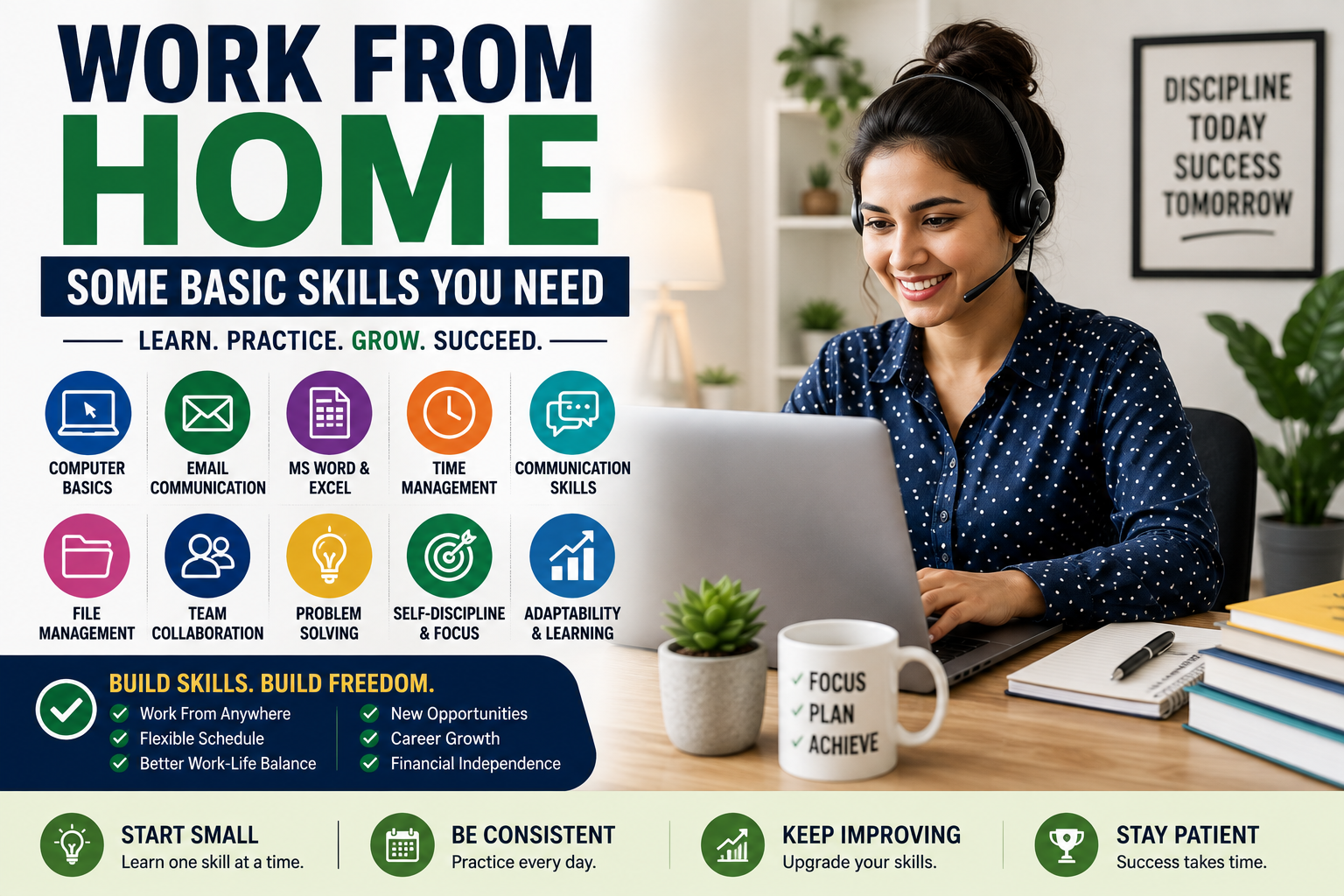
Discover the basic skills needed for work from home jobs, how to develop them, common mistakes, and practical ways to start your remote career.
work from home basic skills
Working from home sounds simple: open your laptop, connect to the internet, complete your tasks, and get paid. In reality, successful remote work requires more than having a computer and a quiet room.
Whether you want a full-time remote career, freelance work, part-time employment, or an online side income, you need a combination of technical, communication, organizational, and self-management skills.
The good news is that you do not need to be an expert before starting.
Many legitimate work-from-home jobs require only basic digital skills and a willingness to learn. Once you develop a strong foundation, you can gradually move into higher-paying areas such as digital marketing, web development, virtual assistance, graphic design, customer support, data analysis, and project management.
This guide explains the work from home basic skills beginners should develop, why each skill matters, which jobs require them, how to improve them, and what you can do if you currently have little or no experience.
What Are the Basic Skills Needed for Work From Home?
The basic skills needed for remote work can be divided into five main categories:
- Computer and digital skills
- Communication skills
- Time-management and organization
- Problem-solving and critical thinking
- Self-discipline and adaptability
For many entry-level jobs, you do not need advanced programming, complicated mathematics, or years of professional experience.
You need to be comfortable using technology, communicating professionally, meeting deadlines, following instructions, and working independently.
Quick list of essential work-from-home skills
- Basic computer knowledge
- Typing
- Internet research
- Email communication
- Microsoft Word or Google Docs
- Spreadsheets
- Video conferencing
- File management
- Time management
- Self-discipline
- Written communication
- Basic problem-solving
- Attention to detail
- Online collaboration
- Ability to learn new software
These skills can be developed through regular practice.
Why Skills Matter More in Remote Work
In a traditional office, a manager can physically see employees working.
Remote work is different.
Your employer may not see you working throughout the day. Instead, they evaluate you based on your:
- Completed tasks
- Communication
- Deadlines
- Quality of work
- Responsiveness
- Reliability
- Ability to solve problems
This means remote workers need a higher level of independence.
Someone with excellent technical skills but poor communication can struggle remotely.
Similarly, someone with average technical skills but excellent organization, communication, and reliability can become a valuable employee.
1. Basic Computer Skills
The first requirement for most work-from-home jobs is basic computer literacy.
You should understand how to:
- Start and shut down a computer
- Install basic software
- Create folders
- Rename files
- Move files
- Download and upload documents
- Copy and paste information
- Use keyboard shortcuts
- Connect devices
- Manage browser tabs
- Use basic settings
- Troubleshoot simple problems
You do not need to become a computer technician.
You simply need enough knowledge to perform everyday tasks without constantly depending on someone else.
Useful keyboard shortcuts
Learning keyboard shortcuts can save considerable time.
For example:
- Ctrl + C — Copy
- Ctrl + V — Paste
- Ctrl + X — Cut
- Ctrl + Z — Undo
- Ctrl + A — Select all
- Ctrl + F — Find
- Ctrl + S — Save
- Alt + Tab — Switch applications
These may seem small, but efficiency matters when you perform repetitive tasks for several hours.
2. Internet Skills
Remote workers spend a significant amount of time online.
You should know how to use a web browser effectively and find reliable information quickly.
Basic internet skills include:
- Searching Google effectively
- Opening multiple tabs
- Finding specific information
- Downloading files
- Uploading files
- Using online forms
- Creating accounts
- Managing browser bookmarks
- Recognizing suspicious websites
- Understanding basic online privacy
Learn better search techniques
Instead of typing a long, vague question, use specific keywords.
For example:
Poor search:
how can I learn Excel for office work online free
Better search:
Excel beginner formulas tutorial
More precise searches usually produce more useful results.
3. Typing Skills
Typing is an underrated work-from-home skill.
Many remote jobs involve writing emails, entering data, creating documents, responding to customers, or communicating through chat.
You do not necessarily need extremely high typing speed.
Accuracy is equally important.
A person who types quickly but constantly makes mistakes may be less productive than someone who types slightly slower with high accuracy.
Jobs where typing is useful
Typing skills can help with:
- Data entry
- Customer support
- Virtual assistance
- Transcription
- Content writing
- Administrative work
- Chat support
- Social media management
If you currently type slowly, practice for 15–20 minutes a day.
Consistency matters more than trying to become extremely fast overnight.
4. Email Communication
Email remains one of the most important communication tools for remote workers.
You should know how to:
- Write a professional email
- Reply clearly
- Use subject lines
- Attach files
- Download attachments
- Forward messages
- Organize emails
- Search previous conversations
- Avoid unnecessary messages
A professional email should usually be:
- Clear
- Short
- Polite
- Specific
- Easy to understand
For example, instead of writing:
Sir I have done the work check it.
A more professional message would be:
Hi John,
I’ve completed the requested task and attached the final file. Please let me know if any changes are needed.
Clear communication creates a professional impression.
5. Google Docs and Microsoft Word
Document-processing skills are useful in a huge range of remote jobs.
You should know how to:
- Create documents
- Format text
- Add headings
- Insert tables
- Add images
- Create lists
- Adjust spacing
- Export files
- Share documents
- Track basic changes
These skills are useful for:
- Virtual assistants
- Writers
- Administrative assistants
- Researchers
- Customer service employees
- Teachers
- Project coordinators
You do not need advanced formatting knowledge to start.
Master the basics first.
6. Spreadsheet Skills
Spreadsheet knowledge can make you much more employable.
Popular spreadsheet tools include:
- Microsoft Excel
- Google Sheets
- Other cloud-based spreadsheet applications
At the beginner level, learn:
- Rows and columns
- Cells
- Basic formatting
- Sorting
- Filtering
- Simple formulas
- Basic charts
- Data entry
Useful beginner formulas
You should eventually understand functions such as:
SUMAVERAGECOUNTMINMAX
Later, you can learn:
IFXLOOKUPVLOOKUPINDEXMATCH- Pivot tables
You do not need advanced Excel knowledge for every remote position.
However, spreadsheet skills can open the door to more administrative and analytical jobs.
7. Communication Skills
Communication may be one of the most important work from home basic skills.
Remote employees communicate through:
- Chat
- Video meetings
- Project-management platforms
- Shared documents
- Voice calls
Because people cannot always see your facial expressions or body language, written communication needs to be especially clear.
Good remote communication means:
- Responding within reasonable time
- Asking clear questions
- Providing updates
- Confirming instructions
- Explaining problems
- Avoiding unnecessary messages
- Remaining professional
8. Written English Skills
For many international remote jobs, English is extremely valuable.
You do not necessarily need advanced academic English.
You should be able to:
- Understand instructions
- Write understandable messages
- Explain problems
- Respond to customers
- Read documentation
- Communicate with colleagues
Good grammar helps, but clarity is more important than complicated vocabulary.
Instead of trying to sound sophisticated, aim to sound clear and professional.
Example
Instead of:
I would like to inform you that unfortunately due to some unforeseen circumstances I was unable to complete the aforementioned task within the stipulated period.
Use:
I’m sorry, but I couldn’t complete the task on time because of an unexpected issue. I’ll finish it by tomorrow.
Simple writing is often better business communication.
9. Video Meeting Skills
Remote companies frequently use video-conferencing software.
You should know how to:
- Join a meeting
- Turn your microphone on and off
- Turn your camera on and off
- Share your screen
- Use chat
- Leave a meeting
- Check your audio
- Test your camera
You should also understand basic meeting etiquette.
During remote meetings:
- Join on time
- Keep your microphone muted when not speaking
- Avoid background noise
- Pay attention
- Take notes
- Do not interrupt unnecessarily
- Ask questions when something is unclear
Professional meeting behavior can make a significant difference.
10. Time Management
Working from home gives you flexibility, but flexibility can become a problem without structure.
At home, distractions are everywhere:
- Social media
- YouTube
- Games
- Family interruptions
- Household chores
- Mobile notifications
- Unplanned breaks
Time management helps you stay productive.
A simple daily structure
You could divide your workday into:
Morning
- Check priorities
- Start important tasks
- Handle urgent communication
Midday
- Continue focused work
- Take a short break
- Review progress
Afternoon
- Complete remaining tasks
- Respond to messages
- Check deadlines
End of day
- Review completed work
- Organize tomorrow’s tasks
- Close unnecessary applications
You do not need an extremely complicated productivity system.
A simple routine can work very well.
11. Self-Discipline
Self-discipline is one of the biggest differences between successful and unsuccessful remote workers.
Nobody may physically stand beside you and tell you:
“Start working.”
You have to create that structure yourself.
Self-discipline means doing the work even when you do not feel motivated.
Build discipline by:
- Starting at a consistent time
- Creating daily goals
- Keeping your phone away
- Using a dedicated workspace
- Taking planned breaks
- Tracking completed tasks
- Avoiding unnecessary multitasking
Motivation comes and goes.
Systems and habits are more reliable.
12. Organization Skills
Remote workers handle many digital files, messages, deadlines, and tasks.
Without organization, things become confusing quickly.
Create folders such as:
Work
├── Projects
├── Documents
├── Reports
├── Images
├── Client Files
└── Completed
Use meaningful file names.
Instead of:
finalnew2.docx
Use:
Client_Project_Report_August_2026.docx
Good organization saves time and reduces mistakes.
13. File Management
You should understand common file formats.
Examples include:
- DOCX
- XLSX
- CSV
- JPG
- PNG
- MP4
- ZIP
You should know how to:
- Compress files
- Extract ZIP files
- Convert documents
- Upload files
- Share files
- Download files
- Store backups
These tasks appear simple, but they are part of everyday remote work.
14. Cloud Storage Skills
Remote teams often store documents online.
You may encounter cloud-storage platforms used for:
- Document sharing
- File backups
- Team collaboration
- Project management
You should understand concepts such as:
- Uploading
- Downloading
- Sharing
- Permissions
- Folders
- File versions
Pay attention to permissions.
Do not accidentally give public access to confidential documents.
15. Basic Cybersecurity Knowledge
Remote workers need to protect company information.
You should understand basic cybersecurity principles.
Use strong passwords
Avoid using the same password everywhere.
Enable two-factor authentication
When available, two-factor authentication adds another layer of protection.
Avoid suspicious links
Do not automatically click links in unexpected emails or messages.
Protect confidential information
Do not share:
- Passwords
- Private company documents
- Customer information
- Financial information
- Login credentials
Keep software updated
Security updates can protect against known vulnerabilities.
Cybersecurity is not only an IT department responsibility.
Every remote worker contributes to an organization’s security.
16. Problem-Solving Skills
Remote workers cannot always immediately ask a manager for help.
You should learn to investigate problems independently.
For example, if a website is not loading:
- Check your internet connection.
- Refresh the page.
- Try another browser.
- Check whether other websites work.
- Search for a known service issue.
- Restart the application.
- Document the problem.
- Contact support if necessary.
The goal is not to solve every technical problem yourself.
The goal is to think before escalating.
17. Attention to Detail
Small mistakes can create major problems.
Imagine a remote employee entering:
$10,000
instead of:
$100,000
Or sending the wrong document to a customer.
Attention to detail matters in:
- Data entry
- Accounting
- Customer service
- Administration
- Research
- Content editing
- E-commerce
- Project management
Develop the habit of reviewing your work before submitting it.
18. Research Skills
Many remote jobs involve finding information online.
Basic research skills include:
- Searching effectively
- Comparing information
- Checking dates
- Identifying reliable information
- Organizing findings
- Summarizing information
Research skills can be especially valuable for:
- Content writers
- Virtual assistants
- SEO specialists
- Researchers
- Marketing assistants
- Data researchers
Do not copy information blindly.
Understand what you are finding and verify important details.
19. Basic Customer Service Skills
Customer support is one of the most common remote career areas.
A good customer-service worker needs:
- Patience
- Clear communication
- Problem-solving
- Empathy
- Product knowledge
- Professional writing
- Attention to detail
Customers may be frustrated.
Your job is not to argue.
Your job is to understand the issue and help resolve it according to company procedures.
20. Basic Digital Marketing Skills
Digital marketing can become a valuable remote career path.
Beginners can start with:
- Social media
- Content creation
- SEO fundamentals
- Email marketing
- Basic analytics
- Online advertising concepts
You do not need to master everything at once.
Choose one area and develop practical skills.
For example:
Beginner → Social media assistant → Social media manager → Digital marketing specialist
Skill progression is often more realistic than trying to learn every marketing discipline simultaneously.
21. Basic Graphic Design Skills
You do not need to become a professional designer to benefit from basic design skills.
Learn:
- Layout
- Typography
- Image sizing
- Contrast
- Color combinations
- Basic branding
Beginner-friendly design tools can help you create:
- Social media posts
- Presentations
- Thumbnails
- Simple advertisements
- Blog graphics
Design skills can complement other careers such as marketing, virtual assistance, and content creation.
22. Basic Video Editing Skills
Video has become an important part of online communication.
Basic editing skills can include:
- Cutting clips
- Adding text
- Adding captions
- Adjusting audio
- Adding transitions
- Resizing videos
- Exporting different formats
These skills can support remote roles such as:
- Social media assistant
- Content creator
- Video editor
- Marketing assistant
Advanced editing can become a specialized career skill.
23. Adaptability
Remote technology changes quickly.
A company might use one communication platform today and another next year.
A marketing team may adopt new software.
A client may change its workflow.
Successful remote workers learn to adapt.
You do not need to know every tool before starting.
Instead, develop the ability to learn new tools quickly.
24. Ability to Learn Independently
This is one of the most valuable long-term skills.
When working remotely, you may not receive face-to-face training every day.
You may need to:
- Read instructions
- Watch tutorials
- Search documentation
- Practice independently
- Ask specific questions
- Experiment safely
Someone who learns quickly can become more valuable over time.
Basic Skills vs. Advanced Skills
Not every remote job requires advanced technical knowledge.
| Basic Skills | Advanced Skills |
|---|---|
| Email automation | |
| Typing | Technical writing |
| Word processing | Document automation |
| Basic Excel | Advanced data analysis |
| Internet research | Professional research |
| Video meetings | Remote team leadership |
| Basic design | Professional graphic design |
| Basic SEO | Technical SEO |
| Customer service | Customer success management |
| File management | Workflow automation |
Start with the left column.
Move toward the right column as your experience increases.
Remote Jobs You Can Start With Basic Skills
Several remote career paths can be accessible to beginners.
Virtual Assistant
Typical responsibilities include:
- Email management
- Scheduling
- Data entry
- Research
- File organization
- Administrative tasks
Useful skills:
- Organization
- Communication
- Word processing
- Spreadsheets
- Internet research
Customer Support Representative
Typical responsibilities:
- Answering questions
- Resolving problems
- Responding through chat or email
- Documenting customer issues
Useful skills:
- Communication
- Patience
- Typing
- Problem-solving
Data Entry
Data-entry work may involve:
- Entering information
- Updating records
- Checking data
- Organizing spreadsheets
Useful skills:
- Typing
- Accuracy
- Excel or spreadsheet basics
- Attention to detail
Content Writing
Writers create:
- Blog articles
- Product descriptions
- Website content
- Social media posts
- Guides
Useful skills:
- Writing
- Research
- Grammar
- Editing
- SEO basics
Social Media Assistant
Responsibilities may include:
- Scheduling posts
- Creating captions
- Responding to comments
- Basic graphic design
- Tracking engagement
Useful skills:
- Social media knowledge
- Writing
- Basic design
- Organization
How to Build Work-From-Home Skills From Zero
You do not need to learn everything simultaneously.
Use a step-by-step approach.
Step 1: Learn Computer Basics
Spend several days becoming comfortable with:
- Files
- Folders
- Browsers
- Software
- Keyboard shortcuts
Step 2: Learn Office Tools
Practice:
- Word processing
- Spreadsheets
- Presentations
- Online documents
Step 3: Improve Communication
Practice writing:
- Emails
- Professional messages
- Short reports
- Task updates
Step 4: Choose One Career Skill
Pick one:
- Virtual assistance
- Customer service
- Writing
- SEO
- Graphic design
- Video editing
- Digital marketing
- Web development
- Data analysis
Do not try to become an expert in ten fields simultaneously.
Step 5: Practice With Real Projects
Theory is not enough.
Create sample projects.
For example, if you want to become a virtual assistant:
- Create a sample spreadsheet
- Organize a fictional calendar
- Write professional emails
- Create a sample research report
This gives you something practical to demonstrate.
How Long Does It Take to Learn Basic Remote Work Skills?
The timeline depends on your starting point and the skill you choose.
A beginner could potentially develop basic computer and communication skills within weeks through consistent practice.
More specialized skills can take months.
For example:
| Skill | Beginner Foundation |
|---|---|
| Virtual assistance | Several weeks |
| Customer support | Several weeks |
| Basic content writing | Several weeks to months |
| Social media management | 1–3 months |
| Graphic design | 1–3+ months |
| SEO | Several months |
| Video editing | 1–3+ months |
| Web development | Several months to a year or more |
| Data analysis | Several months or longer |
These are rough learning ranges, not guarantees.
Your results depend on practice quality, consistency, previous knowledge, and the complexity of the job.
Common Mistakes Beginners Make
Trying to Learn Everything
Learning ten skills at once often creates shallow knowledge.
Choose one primary skill.
Focusing Only on Certificates
Certificates can demonstrate learning, but employers often want evidence that you can actually perform the work.
Build projects.
Ignoring Communication
Technical skills alone are not enough.
A remote professional must communicate clearly.
Applying Without Learning the Job
Do not apply for advanced jobs when you do not understand the required tools.
Start at the appropriate level.
Expecting Instant Income
Learning a skill does not automatically produce income.
You still need:
- Practice
- Portfolio development
- Applications
- Networking
- Interviews
- Client communication
- Consistency
How to Make Yourself More Employable
A strong beginner profile should demonstrate three things:
1. You can perform the work
Build practical projects.
2. You can communicate
Write professionally and respond clearly.
3. You are reliable
Meet deadlines and follow instructions.
These qualities can make a beginner competitive even without years of experience.
Building a Beginner Portfolio
A portfolio does not need to contain paid projects.
Create examples that demonstrate your ability.
For a writer
Create:
- Three blog posts
- Product descriptions
- Social media captions
For a virtual assistant
Create:
- Sample spreadsheet
- Calendar
- Email templates
- Research document
For a designer
Create:
- Social media graphics
- Simple advertisements
- YouTube thumbnails
For a video editor
Create:
- Short-form videos
- Captioned clips
- Promotional videos
The goal is to give a potential employer something concrete to evaluate.
Work From Home Skills That Can Increase Your Earning Potential
Basic skills can get you started.
Specialized skills can increase your long-term opportunities.
Some areas worth developing include:
- SEO
- Web development
- Software development
- Data analytics
- Paid advertising
- Copywriting
- Video editing
- Graphic design
- Cybersecurity
- Project management
- E-commerce management
- Automation
The best skill is not necessarily the one with the highest advertised salary.
The best skill is one that:
- You can learn,
- You can practice,
- Businesses actually need,
- You can demonstrate,
- You can continue improving.
How AI Is Changing Work-From-Home Skills
Artificial intelligence is changing many remote jobs.
Workers increasingly use AI tools for:
- Research
- Drafting
- Brainstorming
- Data organization
- Customer support
- Coding assistance
- Content creation
- Productivity
However, AI does not eliminate the need for human skills.
In many cases, it increases the importance of:
- Critical thinking
- Editing
- Fact-checking
- Creativity
- Communication
- Problem-solving
- Judgment
A strong remote worker should learn how to work with technology rather than simply compete against it.
The Future of Work-From-Home Skills
Remote work continues to evolve.
Basic digital literacy is becoming increasingly important across many industries.
Future remote workers may benefit from combining:
Technical skill + Communication + AI literacy + Problem-solving
For example:
A basic writer may produce articles.
A writer who understands SEO, analytics, AI-assisted workflows, editing, and content strategy can potentially provide much more value.
This illustrates an important career principle:
Do not stop at the first skill you learn. Build skill combinations.
Frequently Asked Questions
What basic skills are needed to work from home?
The most common basic skills include computer literacy, typing, email communication, internet research, document management, spreadsheet basics, time management, organization, communication, and self-discipline.
Can I work from home without experience?
Yes. Some entry-level remote positions accept beginners, particularly in areas such as customer support, virtual assistance, data entry, and certain administrative roles. Building practical skills and sample work can improve your chances.
Do I need advanced computer skills for remote work?
Not necessarily. Many entry-level jobs require only basic computer skills. Advanced technical knowledge becomes important for specialized careers such as programming, cybersecurity, data engineering, and advanced analytics.
Is English necessary for work-from-home jobs?
English is valuable for many international remote jobs because it is widely used for business communication. However, requirements vary by employer, industry, and target market.
How can I improve my work-from-home skills?
Practice daily. Learn basic computer tools, improve communication, choose one specialized skill, complete practical projects, and gradually develop more advanced abilities.
Which remote job is easiest for beginners?
There is no universally easiest remote job. Entry-level opportunities may include customer support, virtual assistance, administrative work, data-related tasks, and some content or social media roles, depending on your existing abilities.
Do I need a laptop to work from home?
Many professional remote jobs require a computer because they involve software, spreadsheets, documents, multitasking, and file management. Some simple tasks can be performed using a smartphone, but a laptop or desktop significantly expands your options.
How important is typing speed for remote work?
Typing speed is useful for jobs involving significant written communication or data entry. However, accuracy and overall productivity are often just as important as raw typing speed.
Can I learn remote work skills for free?
Yes. Many basic skills can be developed through free tutorials, practice projects, documentation, and publicly available educational material. The important part is consistent practice.
What skill should I learn first for remote work?
Start with basic computer literacy and communication. Then choose one specialized skill based on the type of remote job you want to pursue.
Are work-from-home jobs difficult?
Remote work can be challenging because you need to manage your own time, communicate digitally, solve problems independently, and remain productive without constant supervision. The difficulty depends heavily on the specific job.
How can I prove my skills without experience?
Create sample projects. A portfolio can demonstrate what you can actually do even when you have not yet worked with paying clients or employers.
Can students learn work-from-home skills?
Yes. Students can develop digital skills, writing, design, programming, marketing, customer service, and other abilities while studying. The key is to choose a manageable skill and practice consistently.
Final Thoughts
Working from home is not a single profession. It is a way of working that can support dozens of different careers.
You do not need to know everything before you begin.
The most important work from home basic skills are surprisingly practical:
- Know how to use a computer.
- Communicate clearly.
- Manage your time.
- Organize your files.
- Meet deadlines.
- Solve basic problems.
- Pay attention to details.
- Learn new software.
- Work independently.
- Keep improving.
Once you have these foundations, choose one specialized skill and develop it deeply.
For example, you could start with basic computer skills and move toward virtual assistance. Someone else might learn writing and then specialize in SEO content. Another person might start with basic design and eventually become a professional graphic designer.
The key is progression.
You do not need to become an expert in everything. You need to become useful at something.
Actionable Takeaways
- Master basic computer skills first.
- Improve your written and verbal communication.
- Learn Word/Google Docs and spreadsheet basics.
- Practice typing and accurate data entry.
- Develop time-management and self-discipline.
- Learn basic cybersecurity and online safety.
- Choose one specialized remote-work skill.
- Practice that skill through real projects.
- Build a simple portfolio before applying widely.
- Learn to use modern AI and productivity tools responsibly.
- Continue improving instead of constantly switching skills.
- Focus on becoming reliable, not just technically knowledgeable.
The biggest advantage of remote work is not simply being able to work from your home. It is the ability to build valuable digital skills that can potentially connect you with employers, clients, and businesses far beyond your local area.
Start with the basics, build one valuable skill at a time, create proof of what you can do, and keep improving. That approach gives beginners a much stronger foundation for building a sustainable remote career.